| Version 11 (modified by , 6 years ago) ( diff ) |
|---|
Site Navigation
- COSMOS Testbed Overview
- Getting Started
- COSMOS/ORBIT User Guide
- COSMOS Portal
- Account Management
- Portal Dashboard
- Directory
- Disk Images
- Community Forum
- Getting Started with the COSMOS Portal
- SSH Access to Testbed Nodes
- Scheduler
- Testbed Status
- Installing Chrome Remote Desktop (CRD) on a Custom Image
- Tutorials
- Architecture
- Resources, Services and APIs
- Datasets
- Hardware Info
- RF Policies & Compliance
Testbed Workflow
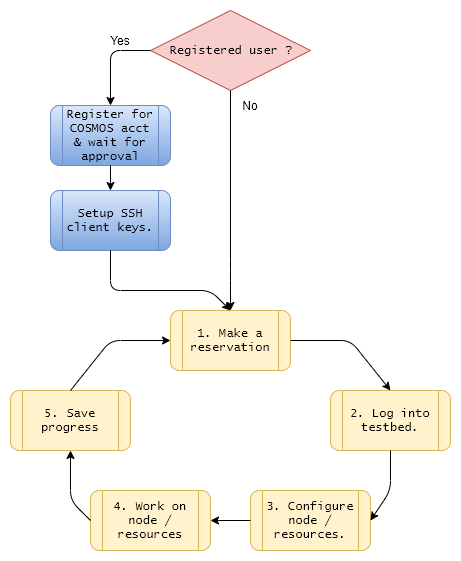
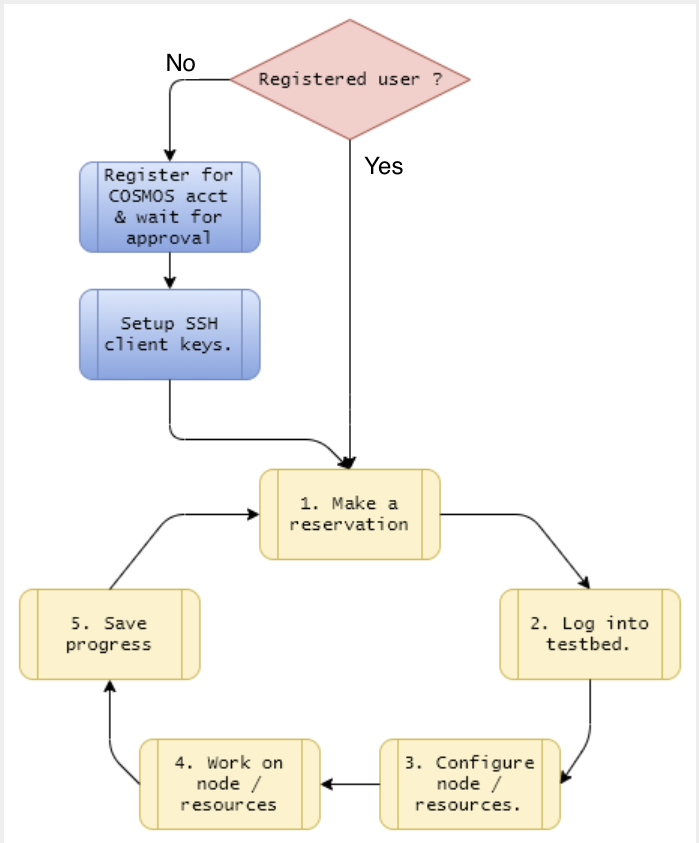
Typical work process on COSMOS is shown below. This is suggested as a reference for first-time users. Registration and setting up the ssh client are a one-time process after which the basic work flow cycle begins. This work flow is shown below in an event flow figure.

Registration
In order to use the test bed you must register for an account. Registration can be done as an individual or an organization. To register as an individual use the new user registration form. Otherwise to register as a group or organization use this form here.
Setting up SSH client
Access to the COSMOS resources is done remotely via SSH. How the SSH client is set up depends on the type of OS you are using. Please see Configuring SSH Keys for specific details. This should be enough to get started with but for more advanced information please check ssh client configuration and ssh tips for common issues.
1. Making a reservation
You'll need to allocated a set of nodes / resources at a specific date/time under your registered account name. This process is outlined here - create a reservation.
2. Log into testbed
Log into the console of your reserved domain. Once you're logged into the console you'll have access to all the resources under that domain.
3. Configure node / resources
Now you're ready to check and load images (ie. Linux operating system) onto the available resources - here.
4. Work / develop using nodes / resources
At this point you'll be able to all your resources are accessible. You should be able to log into the resource and start development. As an example refer to the basic usage tutorial for this process.
5. Save progress prior to reservation time ending
This is always optional  In the case when you have made additions to the loaded image, you may want to save it prior to your reservation time ending. The saving process is described here. By saving the resource's image you can reload it at a later time and continue where you left off.
Attachments (2)
- COSMOS work flow.png (33.9 KB ) - added by 7 years ago.
- COSMOS basic workflow.png (105.5 KB ) - added by 11 months ago.
Download all attachments as: .zip