wiki:Architecture

Site Navigation

  1. COSMOS Testbed Overview
    1. Concepts
    1. Testbed Workflow
    1. Availability and Resource Status
    1. Events and Conferences
  2. Getting Started
    1. Make an Account
    2. Create and Configure SSH Keys
    3. Make a Reservation
    4. Log in to your Reservation
    5. Control Resources with OMF
    6. Run a Hello World Experiment
    7. Get Help and Support
  3. COSMOS/ORBIT User Guide
    1. The COSMOS Portal
    2. Connecting to the Testbed
    3. Running Experiments
    4. Policies and Support
    5. Quick Links
    1. Policies
    1. Account Creation
    1. Camera Streaming
    1. Scheduling and Reservations
    1. Disk Images
    1. Frequently Asked Questions
    1. Resource Control with OMF
  4. COSMOS Portal
    1. Your First Visit
    2. Setting Up Your Account
    3. Reserving Testbed Time
    4. Monitoring Your Experiment
    5. Connecting via SSH
    6. Managing Disk Images
    7. Joining the Community
    8. Browsing Users and Groups
    9. Tips
  5. Account Management
    1. Edit Profile
    2. Change Password
    3. SSH Keys
  6. Portal Dashboard
    1. Profile Card
    2. Usage Statistics
    3. Community Forum
  7. Directory
    1. Users
    2. Groups
    3. Privacy Note
  8. Disk Images
    1. Browsing Images
    2. Image Details
    3. Searching and Sorting
    4. Managing Your Images
    5. Baseline Images
    6. Saving Custom Images
    7. Storage and Retention
  9. Community Forum
    1. Accessing the Forum
    2. Forum Categories
    3. How to Use the Forum
    4. Forum Etiquette
    5. Privacy and Access
  10. Getting Started with the COSMOS Portal
    1. Creating an Account
    2. Logging In
    3. What to Do After Logging In
  11. SSH Access to Testbed Nodes
    1. Access Model
    2. Console Servers
    3. Basic Connection
    4. SSH Config File
    5. SSH Tunneling
    6. File Transfer
    7. Troubleshooting
  12. Scheduler
    1. Calendar View
    2. Reservation Colors
    3. Creating a Reservation
    4. Competing for a Slot
    5. Modifying or Canceling Reservations
    6. My Reservations
    7. Resource Information
  13. Testbed Status
    1. Node Status Grid
    2. RF Matrix Control (SB4)
    3. Understanding Node States During Experiments
    1. Remote Access
    1. Chrome Remote Desktop Setup Page
  14. Installing Chrome Remote Desktop (CRD) on a Custom Image
    1. Measurement & Result Collection
    1. Storage
    1. Support
    1. Contributing to the Wiki
  15. Tutorials
    1. SDR and Wireless
    2. Wireless Digital Twins
    3. Optical Networking
    4. Wired Networking
    5. Edge Computing
    6. 4G/5G Systems
    7. Orchestration Platforms
  16. Architecture
    1. Data Flow
    1. Deployment Map
    1. Domains
    1. Naming Convention
    1. Networks
    1. Optical
  17. Resources, Services and APIs
    1. RF Control
    2. SDR Control
    3. Compute Control
    4. Network Control
    5. Optical Control
  18. Datasets
  19. Hardware Info
    1. Cameras
    1. Compute
    1. FR3 SDRs
    1. Network
    1. Nodes
    1. Optical
    1. RF Subsystems
    1. Antennas
    1. Full-Duplex Radio
    1. RF Front End
    1. Software Defined Radios (SDR)
  20. RF Policies & Compliance
    1. Outdoor Radio Frequency Allocation
    2. Program Experiment License
    3. Spectrum Monitoring
    4. Emergency Stop Procedures
    5. Network and Platform Security

Architecture

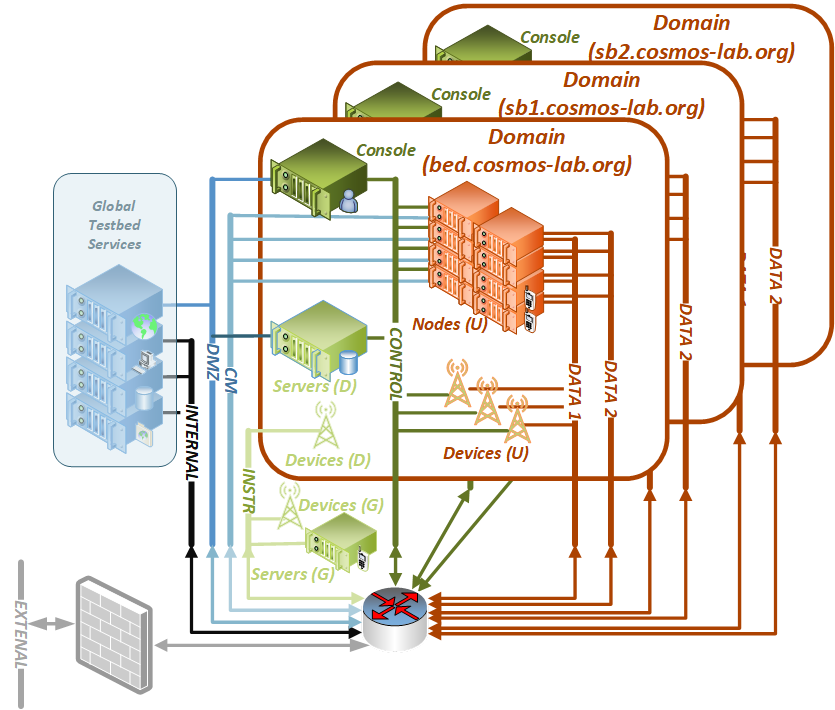
Figure 1 presents a system view of the COSMOS testbed. It is based on a multi-layered computing system built in a bottom-up manner with commodity components, programmable hardware, and open-source software.

The collection of global testbed services are deployed on a pair of computing clusters located at WINLAB's ORBIT facility in North Brunswick, NJ and Columbia University CS data center (CRF) in West Harlem in New York City, NY.

COSMOS Testbed Architecture
Figure 1: Testbed Architecture

These core services are supporting multiple experimentation domains. As is shown in Figure 1, each of the domains consists of the following components:

  • on-boarding (console) and domain support server(s)
  • SDR nodes (user devices and radio hardware),
  • edge cloud servers ("radio cloud")
  • general purpose computing cloud servers ("core cloud")
  • networking (both optical and electrical)

While most of the devices in each domain are fully under user control (labeled with (U) in the architecture figure), a number of domain-level devices (labeled with (D)) are providing services and can only be partially configured by the user (i.e. are deployed with restricted user access). Similarly, a number of services and devices are deployed globally (labeled G in the figure) for the entire testbed.

COSMOS includes three types of radio nodes:

  • large (rooftop installed "multi-sector base station" (BS))
  • medium (building-side-mounted or light-pole-mounted "microcellular BSs")
  • small (fixed or mobile).

Finally, the core cloud for the large testbed domain (bed.cosmos-lab.org) is split across two locations in NYC: uptown CU CRF data center and downtown NYU data center (at [32 AoA which is also one of the main national and international interconnect location) interconnected with the high-speed optical backbone.

Last modified 6 years ago Last modified on May 18, 2020, 12:32:50 PM

Attachments (1)

Download all attachments as: .zip

Note: See TracWiki for help on using the wiki.