Site Navigation
- COSMOS Testbed Overview
- Getting Started
- COSMOS/ORBIT User Guide
- COSMOS Portal
- Account Management
- Portal Dashboard
- Directory
- Disk Images
- Community Forum
- Getting Started with the COSMOS Portal
- SSH Access to Testbed Nodes
- Scheduler
- Testbed Status
- Installing Chrome Remote Desktop (CRD) on a Custom Image
- Tutorials
- Architecture
- Resources, Services and APIs
- Datasets
- Hardware Info
- RF Policies & Compliance
Measurement & Result Collection
The ORBIT measurement library (OML), is a distributed software framework enabling real-time collection of data in a large testbed environment.
Although this framework was originally developed for ORBIT, it has been re-factored and significantly extended by Data61 CSIRO to allow its independent deployment on any testbed.
OML has three major components :
- The OML-Service, which can generate wrapper code for a c/c++ applications to interact with OML and also creates runtime experiment client/server files based on an experiment definition.
- The OML-Client library, which is deployed on the nodes participating in the experiment and can aggregate and filter data from the applications participating in the experiment and send it to a central server.
- The OML-Collection-Server, which collects filtered data coming from all nodes involved in the experiment and stores it in a mySQL database.
Publications :
- The original OML paper:
ORBIT Measurements Framework and Library (OML): Motivations, Design,Implementation, and Features Manpreet Singh, Maximilian Ott, Ivan Seskar and Pandurang Kamat, proceedings of IEEE Tridentcom 2005, Trento, Italy, Feb 2005 - The recent paper on current OML release:
An Instrumentation Framework for the Critical Task of Measurement Collection in the Future Internet O. Mehani, G. Jourjon, T. Rakotoarivelo and M. Ott., Elsevier Computer Networks, pp. 68-83, 2014
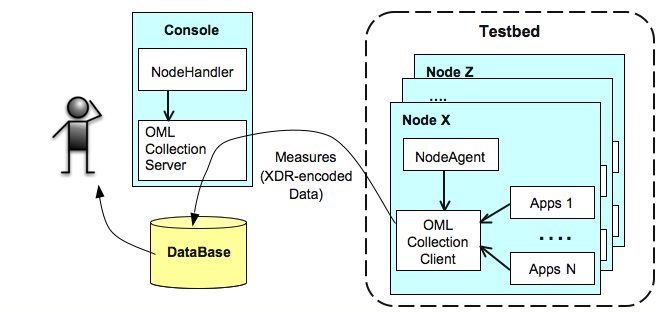
The OML client/server architecture is illustrated in the figure below.

Figure: OML component architecture
The central OML Collection Server is available in every domain for collection of experimental results from the various resources involved in the experiment. The server uses an SQL database for persistent data archiving of these results.
On each experimental node, one OML Collection Client is associated with each experimental applications. In the context of this introduction, the client-side measurement collection can be viewed as follows. The application will forward any required measurements or outputs to the OML collection client. This OML client will optionally apply some filter/processing to these measurements/outputs, and then send them to the OML Collection Server (currently over one multicast channel per experiment for logical segregation of data and for scalability)
More details on OML are available on the OML documentation site as well as in the basic SDR measurement collection tutorial.
Attachments (1)
-
OML-overview.png
(45.4 KB
) - added by 6 years ago.
OML Architecture
Download all attachments as: .zip