Site Navigation
- COSMOS Testbed Overview
- Getting Started
- COSMOS/ORBIT User Guide
- COSMOS Portal
- Account Management
- Portal Dashboard
- Directory
- Disk Images
- Community Forum
- Getting Started with the COSMOS Portal
- SSH Access to Testbed Nodes
- Scheduler
- Testbed Status
- Installing Chrome Remote Desktop (CRD) on a Custom Image
- Tutorials
- Architecture
- Resources, Services and APIs
- Datasets
- Hardware Info
- RF Policies & Compliance
Open Spatial Computing Platform (OSCP)
Description

Resources required
Tutorial Setup
Create Extra Disk Space (if needed)
Modify /etc/hosts file to add references for named services. In real deployment, this would require modifying DNS records.
Configure extra disk (if applicable)
sudo mkfs -t xfs /dev/nvme1n1
sudo mkdir /data
sudo mount /dev/nvme1n1 /data
sudo cp /etc/fstab /etc/fstab.orig
sudo lsblk -o +UUID
Update /etc/fstab with new line including UUID from above:
UUID=4cec62c2-7f6b-4141-86f7-8c2a38e6f3fa  /data  xfs  defaults,nofail  0  2
sudo umount /data
sudo mount -a
sudo chown ubuntu:ubuntu /data
Install Prerequisite Packages
Install npm version manager
curl -L https://raw.githubusercontent.com/tj/n/master/bin/n -o n
sudo bash n lts
sudo npm install -g n
Install nginx and pm2
sudo apt update
sudo apt install nginx
sudo npm install pm2 -g
Install Spatial Service Discovery
Create a folder for the code and build files. The path is your choice.
mkdir /data/ssddev
cd /data/ssddev
Create a folder for data store. The path is your choice, but it should be added in the .env file in variable KAPPA_CORE_DIR later below.
mkdir data
git clone https://github.com/OpenArCloud/oscp-spatial-service-discovery.git
cd oscp-spatial-service-discovery
Disable authentication (optional, not recommended for production deployment):
cp src/router-noauth.ts src/router.ts
Install the dependencies and build the project:
npm install
npm run-script build
Add an appropriate .env file:
touch .env
nano .env
and make sure it contains
KAPPA_CORE_DIR="/home/native/dev/ssd_data"
SWARM_TOPIC_PREFIX="orbit_ssd"
AUTH0_ISSUER=https://ssd-oscp.us.auth0.com/
AUTH0_AUDIENCE=https://ssd.orbit-lab.org
COUNTRIES=AT,BE,BG,CY,CZ,DE,DK,EE,ES,FI,FR,GR,HR,HU,IE,IT,LT,LV,LU,MT,NL,PL,PT,RO,SE,SI,SK,US
PORT=4100
WARNING: having or not having trailing slash in the domain (AUTH0_AUDIENCE) must match the entry in Auth0! In addition, the way we extract username from Java Web Tokens with jwt-decode library assumes that there is no trailing slash in the audience URI.
WARNING: the trailing / in AUTH0_ISSUER seems to be important, otherwise the client’s POST request return with error that https://ssd-oscp.us.auth0.com.well-known is not found.
Start the service:
pm2 start dist/server.js --name ssd_orbit
Install Spatial Content Discovery Service
Create a folder for the code and build files. The path is your choice.
mkdir /data/scddev
cd /data/scddev
Create a folder for data store. The path is your choice, but it should be added in the .env file below
mkdir data
git clone https://github.com/OpenArCloud/oscp-spatial-content-discovery.git
cd oscp-spatial-content-discovery
Disable authentication (optional, not recommended for production):
cp src/router-noauth.ts src/router.ts
Install the dependencies and build the project:
npm install
npm run-script build
Add an appropriate .env file:
touch .env
nano .env
with
KAPPA_CORE_DIR="/home/native/dev/scd_data"
AUTH0_ISSUER=https://scd-oscp.us.auth0.com/
AUTH0_AUDIENCE=https://scd.orbit-lab.org
GEOZONE="4671654"
TOPICS="transit,history,entertainment,general"
PORT=3100
WARNING: having or not having trailing slash in the domain (AUTH0_AUDIENCE) must match the entry in auth0
WARNING: the trailing / in AUTH0_ISSUER seems to be important, otherwise the client’s POST request return with error that https://scd-oscp.us.auth0.com.well-known is not found
Start the service:
pm2 start dist/server.js --name scd_orbit
Attachments (1)
-
OSCP.png
(82.5 KB
) - added by 4 years ago.
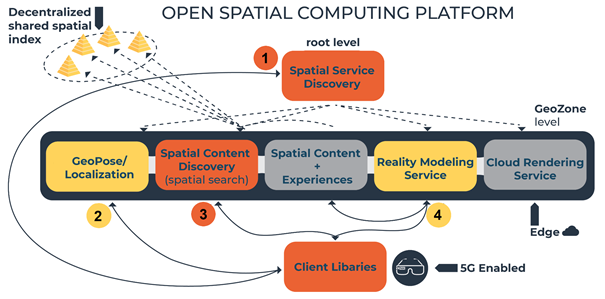
OSCP Block Diagram
Download all attachments as: .zip