Site Navigation
- COSMOS Testbed Overview
- Getting Started
- COSMOS/ORBIT User Guide
- COSMOS Portal
- Account Management
- Portal Dashboard
- Directory
- Disk Images
- Community Forum
- Getting Started with the COSMOS Portal
- SSH Access to Testbed Nodes
- Scheduler
- Testbed Status
- Installing Chrome Remote Desktop (CRD) on a Custom Image
- Tutorials
- Architecture
- Resources, Services and APIs
- Datasets
- Hardware Info
- RF Policies & Compliance
InterDigital 5G NR Platform
 InterDigital has developed for research and development purposes their FPGA based, NR Rel-15 mmWave prototype platform. Each Mast Head unit (MHU) contains a 64-element antenna with +40dBm RMS, Anokiwave quad analog phased array chips, 28GHz up/down conversion from/to 5-6GHz IF that is housed in an IP67 weather proof enclosure.
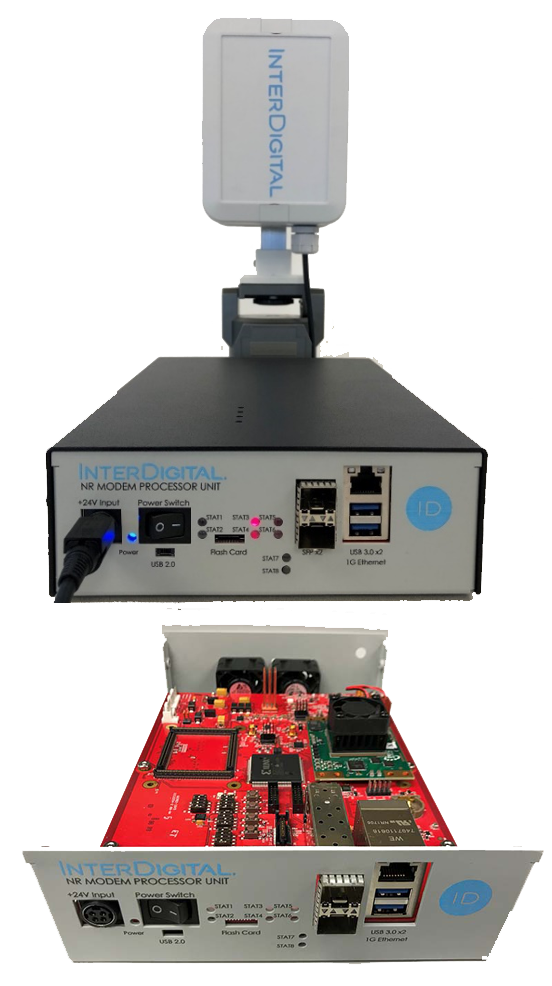
The baseband unit, Modem Processor Unit (MPU) is designed according to 3GPP Rel-15 PHY specifications and is implemented in a Xilinx MPSOC FPGA. The MPU contains two Xilinx Zu15EG SOM modules (2nd for future use), IF frontend, USB 2.0/3.0, SFP ports, Gigabit Ethernet interfaces and a SMA connection to the MHU.
The MPU is configurable as either a 5G UE or gNB with the appropriate PHY, thin MAC/RLC functionality.
The current implementation supports a single UE and gNB, however the system was designed to support 2 UEs using different gNB beams and appropriate changes to the UE scheduler.
InterDigital has developed for research and development purposes their FPGA based, NR Rel-15 mmWave prototype platform. Each Mast Head unit (MHU) contains a 64-element antenna with +40dBm RMS, Anokiwave quad analog phased array chips, 28GHz up/down conversion from/to 5-6GHz IF that is housed in an IP67 weather proof enclosure.
The baseband unit, Modem Processor Unit (MPU) is designed according to 3GPP Rel-15 PHY specifications and is implemented in a Xilinx MPSOC FPGA. The MPU contains two Xilinx Zu15EG SOM modules (2nd for future use), IF frontend, USB 2.0/3.0, SFP ports, Gigabit Ethernet interfaces and a SMA connection to the MHU.
The MPU is configurable as either a 5G UE or gNB with the appropriate PHY, thin MAC/RLC functionality.
The current implementation supports a single UE and gNB, however the system was designed to support 2 UEs using different gNB beams and appropriate changes to the UE scheduler.
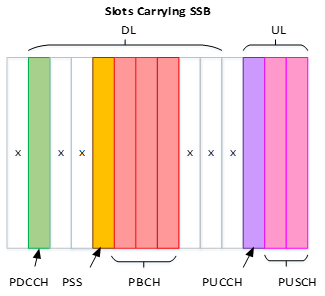
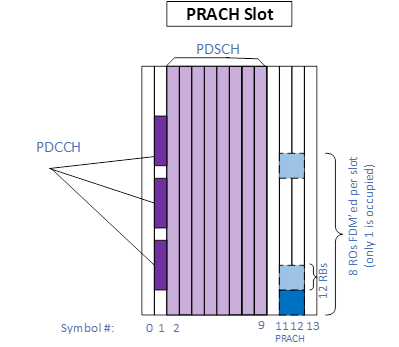
The NR platform is a TDD system with a baseband that supports FR2, 120KHz sub-carrier spacing, fixed frame format (modified format 32), 200MHz bandwidth, SISO, NR LDPC coding for data channels, convolutional coder* for PUCCH and PDCCH and 8 SSB beams with CSI reporting for link adaptation. The MHU/MPU system supports horizontal beam angles of: ± 45deg, ± 30deg, ± 15 deg, 0deg and a single fixed vertical beam. The Rel-15 PHY supports DL and UL channels: PDSCH, PDCCH, PUSCH, PUCCCH, PBCH, PRACH, PSS. The PHY supports QPSK, 16QAM and 64QAM, DL MCS up to 18 and UL MCS up to 27 using the full 132 PRBs. The system is designed to support peak UL speeds up to 100Mbps and peak DL speeds up to 238Mbps.
The UE and gNB each have a NR FAPI-like interface between the PHY and MAC that facilitates the option to integrate the PHY with a 3rd party L23 protocol stacks.
The slot format used on the platform is slot format 32, modified by using 2 symbols for DTx purposes to allow for Tx/RX radio switching delays.

Symbols used for DL and UL shared and control channels Symbols used for PSS and PBCH during slots carrying SSB information. Symbols used for PRACH during PRACH slots 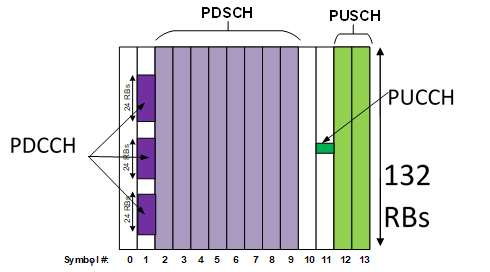


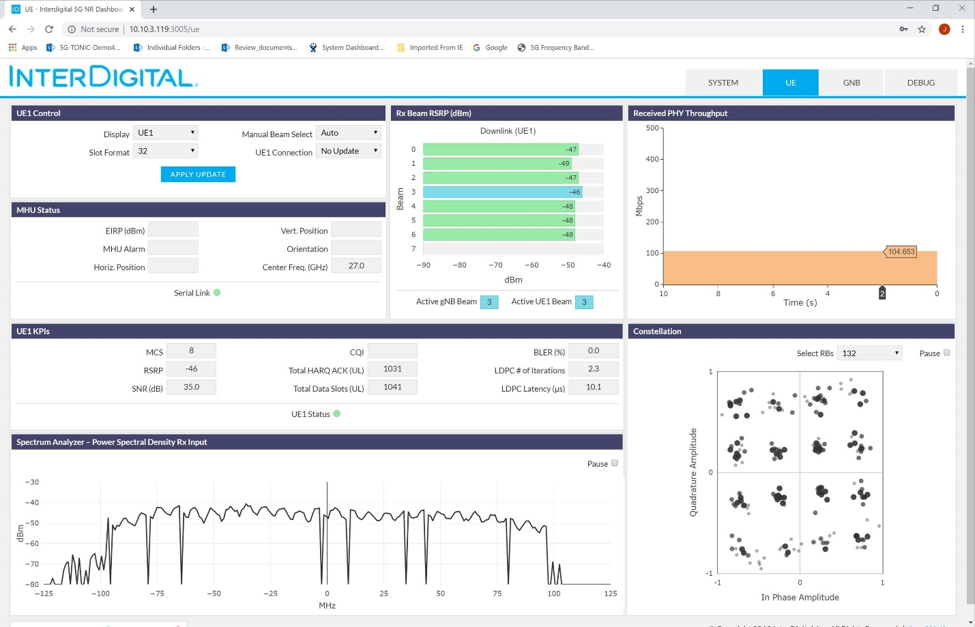
The system has a Web application that runs from a server connected to the MPUs over Ethernet, and displays key PHY parameter such as BRSRP, MCS, LDPC iterations, SNR, as well as displaying ave. PHY throughput, received Spectrum and Tx Constellation for both the UE and gNB. There is a Debug tab for reading UE or gNB logs. Alternatively, metrics can also be logged to the database when enabled where all data streamed to the GUI will be saved in the database. Query operations can be used by a Mongo client to browse or retrieve data and metrics.

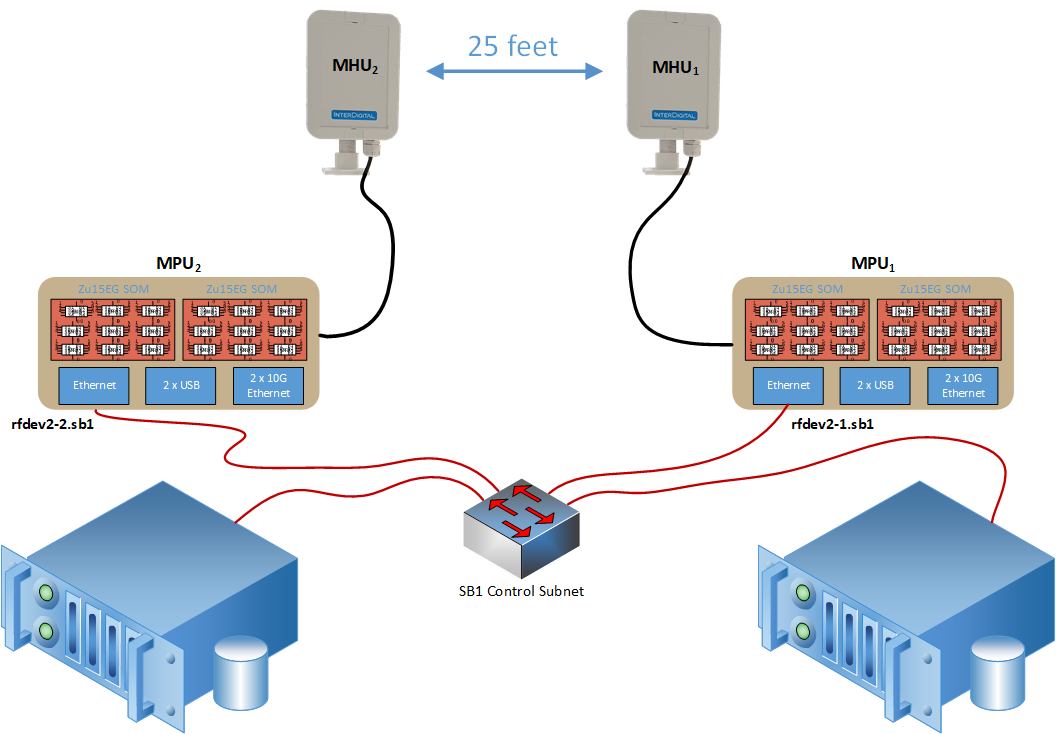
The two 5G NR units, spaced 25 feet apart, are deployed as part of the COSMOS Sandbox 1 and are available for experimentation.

Attachments (7)
- slots1.png (16.4 KB ) - added by 6 years ago.
- slots2.png (10.6 KB ) - added by 6 years ago.
- slots3.png (15.2 KB ) - added by 6 years ago.
- slotformat32.png (7.6 KB ) - added by 6 years ago.
- webapp.png (261.3 KB ) - added by 6 years ago.
-
ID-5GNR-Deploy.png
(125.0 KB
) - added by 6 years ago.
InterDigital 5G NR Platfrom Deployment in SB1
- id-nr-bd1.png (351.6 KB ) - added by 6 years ago.
Download all attachments as: .zip