wiki:Architecture/Domains/cosmos_weeks

Site Navigation

  1. COSMOS Testbed Overview
    1. Concepts
    1. Testbed Workflow
    1. Availability and Resource Status
    1. Events and Conferences
  2. Getting Started
    1. Make an Account
    2. Create and Configure SSH Keys
    3. Make a Reservation
    4. Log in to your Reservation
    5. Control Resources with OMF
    6. Run a Hello World Experiment
    7. Get Help and Support
  3. COSMOS/ORBIT User Guide
    1. The COSMOS Portal
    2. Connecting to the Testbed
    3. Running Experiments
    4. Policies and Support
    5. Quick Links
    1. Policies
    1. Account Creation
    1. Camera Streaming
    1. Scheduling and Reservations
    1. Disk Images
    1. Frequently Asked Questions
    1. Resource Control with OMF
  4. COSMOS Portal
    1. Your First Visit
    2. Setting Up Your Account
    3. Reserving Testbed Time
    4. Monitoring Your Experiment
    5. Connecting via SSH
    6. Managing Disk Images
    7. Joining the Community
    8. Browsing Users and Groups
    9. Tips
  5. Account Management
    1. Edit Profile
    2. Change Password
    3. SSH Keys
  6. Portal Dashboard
    1. Profile Card
    2. Usage Statistics
    3. Community Forum
  7. Directory
    1. Users
    2. Groups
    3. Privacy Note
  8. Disk Images
    1. Browsing Images
    2. Image Details
    3. Searching and Sorting
    4. Managing Your Images
    5. Baseline Images
    6. Saving Custom Images
    7. Storage and Retention
  9. Community Forum
    1. Accessing the Forum
    2. Forum Categories
    3. How to Use the Forum
    4. Forum Etiquette
    5. Privacy and Access
  10. Getting Started with the COSMOS Portal
    1. Creating an Account
    2. Logging In
    3. What to Do After Logging In
  11. SSH Access to Testbed Nodes
    1. Access Model
    2. Console Servers
    3. Basic Connection
    4. SSH Config File
    5. SSH Tunneling
    6. File Transfer
    7. Troubleshooting
  12. Scheduler
    1. Calendar View
    2. Reservation Colors
    3. Creating a Reservation
    4. Competing for a Slot
    5. Modifying or Canceling Reservations
    6. My Reservations
    7. Resource Information
  13. Testbed Status
    1. Node Status Grid
    2. RF Matrix Control (SB4)
    3. Understanding Node States During Experiments
    1. Remote Access
    1. Chrome Remote Desktop Setup Page
  14. Installing Chrome Remote Desktop (CRD) on a Custom Image
    1. Measurement & Result Collection
    1. Storage
    1. Support
    1. Contributing to the Wiki
  15. Tutorials
    1. SDR and Wireless
    2. Wireless Digital Twins
    3. Optical Networking
    4. Wired Networking
    5. Edge Computing
    6. 4G/5G Systems
    7. Orchestration Platforms
  16. Architecture
    1. Data Flow
    1. Deployment Map
    1. Domains
    1. Naming Convention
    1. Networks
    1. Optical
  17. Resources, Services and APIs
    1. RF Control
    2. SDR Control
    3. Compute Control
    4. Network Control
    5. Optical Control
  18. Datasets
  19. Hardware Info
    1. Cameras
    1. Compute
    1. FR3 SDRs
    1. Network
    1. Nodes
    1. Optical
    1. RF Subsystems
    1. Antennas
    1. Full-Duplex Radio
    1. RF Front End
    1. Software Defined Radios (SDR)
  20. RF Policies & Compliance
    1. Outdoor Radio Frequency Allocation
    2. Program Experiment License
    3. Spectrum Monitoring
    4. Emergency Stop Procedures
    5. Network and Platform Security

Weeks Hall (weeks.cosmos-lab.org)

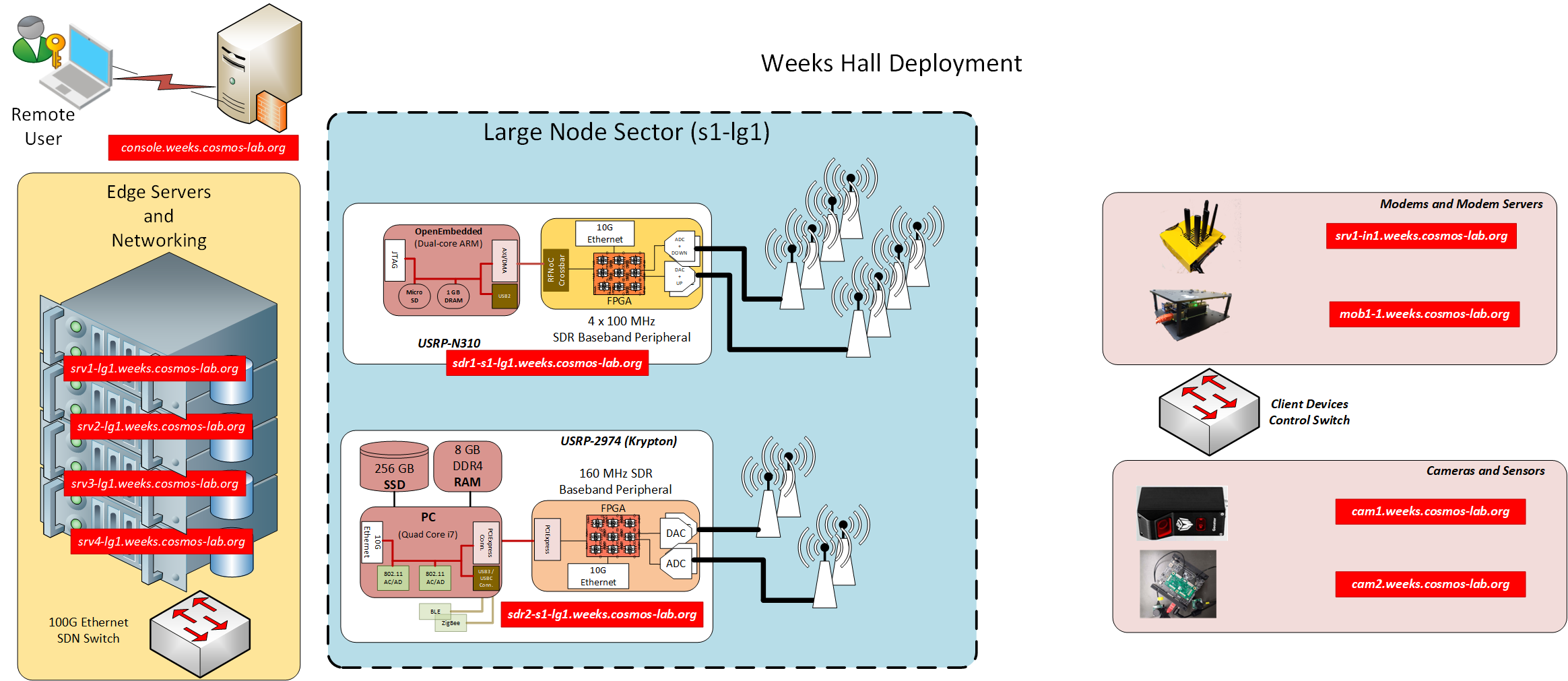
As shown in the figure, one large programmable software defined COSMOS radio node sectors and a pair of small nodes are deployed, in collaboration with Siemens and Rutgers University, in the New Jersey Advanced Manufacturing Institute operated by the Mechanical & Aerospace department at Rutgers. The objective of the this sandbox (Pilot 5G Factory in Weeks Hall) is to allow the design and development of advanced manufacturing techniques that require low latency and high reliability communications integrated with edge computing. The overall goal is to use emerging wireless and edge cloud capabilities to enable speed and flexibility in terms of manufacturing floor reconfigurability.

Weeks Hall Block Diagram

Weeks Hall resources:

  • Ethernet Switch
    • Dell Z9100
  • Computing Resources:
    • 4 high performance compute servers
  • SDR Resources
  • Modems and Modem Servers
    • 4th generation (Yellow) node with Simcom SIM8200
    • Raspberry Pi with with Simcom SIM8200
  • Sensors and Cameras
    • Gocator Laser Sensor
    • NVIDIA Jetson Xavier node with dual camera

IP Address Assignment

Device Control Network Data Network 1 Data Network 2
Large Node Servers
Server 1 10.44.1.1 (srv1-lg1) 10.45.1.1 (srv1a-lg1) 10.46.1.1 (srv1b-lg1)
Server 2 10.44.1.2 (srv2-lg1) 10.45.1.2 (srv2a-lg1) 10.46.1.2 (srv2b-lg1)
Server 3 10.44.1.3 (srv3-lg1) 10.45.1.3 (srv3a-lg1) 10.46.1.3 (srv3b-lg1)
Server 4 10.44.1.4 (srv4-lg1) 10.45.1.4 (srv4a-lg1) 10.46.1.4 (srv4b-lg1)
Large Node SDRs
USRP N310 (S1) 10.44.2.1 (sdr1-s1-lg1) 10.45.2.1 (sdr1a-s1-lg1) 10.46.2.1 (sdr1b-s1-lg1)
USRP 2974 (S1) 10.44.2.2 (sdr2-s1-lg1) 10.45.2.2 (sdr2a-s1-lg1) 10.46.2.2 (sdr2b-s1-lg1)
Modems and Modem Servers
Yellow Node 10.44.3.1 (srv1-in1) 10.45.3.1 (srv1a-in1) -
Raspberry Pi 10.44.3.2 (mob1-1) - -
Camera and Sensor Devices
Gocator 10.44.3.1 (cam1) - -
Xavier 10.44.3.2 (cam2) - -
Last modified 2 months ago Last modified on Jan 26, 2026, 9:27:10 PM

Attachments (1)

Download all attachments as: .zip

Note: See TracWiki for help on using the wiki.