| Version 14 (modified by , 3 years ago) ( diff ) |
|---|
Site Navigation
- COSMOS Testbed Overview
- Getting Started
- COSMOS/ORBIT User Guide
- COSMOS Portal
- Account Management
- Portal Dashboard
- Directory
- Disk Images
- Community Forum
- Getting Started with the COSMOS Portal
- SSH Access to Testbed Nodes
- Scheduler
- Testbed Status
- Installing Chrome Remote Desktop (CRD) on a Custom Image
- Tutorials
- Architecture
- Resources, Services and APIs
- Datasets
- Hardware Info
- RF Policies & Compliance
Wideband Channel Sounding with USRP 2974s
Description
Channel sounding is the process of evaluating the characteristics of a radio environment. Evaluating the power delay profile (PDP) of a radio channel helps in developing statistical models for channel simulation.
This tutorial demonstrates how to use the RFNoC channel sounder design for obtaining the PDP of channels up to 100MHz wide. On the transmit side, data samples are spread using a PN sequence. On the receive end, an FPGA correlator module computes real time correlation power, and an averaging module, averages contiguous sets of PDP over time. The results are continuously sent to the host CPU. This design is compatible with 3rd generation Ettus USRP devices and this tutorial uses USRP 2974s on COSMOS SandBox1.
Note: This experiment uses USRP 2974s in stand-alone mode, where the UHD application runs on the internal PC. So, HG FPGA image should suffice. For non-standalone mode, where the application runs on a host server, XG FPGA image is required.
Prerequisites
In order to access the test bed, create a reservation and have it approved by the reservation service. Access to the resources is granted after the reservation is confirmed. Please follow the process shown on the COSMOS work flow page to get started.
Resources required
2 rooftop USRP 2974s (sdr2-md1, sdr2-s1-lg1) are required for this experiment.
Tutorial Setup
Follow the steps below to gain access to the sandbox 1 console and set up nodes with appropriate images.
- If you don't have one already, sign up for a COSMOS account
- Create a resource reservation on sandbox 1
- Login into sandbox 1 console (console.sb1.cosmos-lab.org) with two SSH sessions.
- Make sure all the nodes and devices used in the experiment are turned off:
omf tell -a offh -t sdr2-md1,sdr2-s1-lg1
- The image channel-sounder.ndz has UHD, Gnu Radio installed, with RFNoC enabled. Custom RFNoC modules required for channel sounding are also installed.
Load channel-sounder.ndz on sdr2-md1,sdr2-s1-lg1.
omf load -i channel-sounder.ndz -t sdr2-md1,sdr2-s1-lg1
- Turn all the required resources on and check the status
omf tell -a on -t sdr2-md1,sdr2-s1-lg1
omf stat -t system:topo:allres
- ssh to the nodes, use option -Y for using GUI.
When opening a session into console.sb1.cosmos-lab.org, set up a tunnel from localhost:5105 to console.sb1.cosmos-lab.org:5100. This will be used by the web application to connect to a server running on one of the SDRs.
Experiment Execution
Prepare the USRPs
- Check if USRPs have the modules required for the experiment by running uhd_usrp_probe on each on of them.
If you see the above at the end of uhd_usrp_probe output, the USRPs are ready. Spreader_0 is used to spread the transmit signal, and Corrmag63avg8k_0 is the correlator on the receive side.
root@sdr2-md1:~# uhd_usrp_probe --args="type=x300,fpga=HG"

|   |     _____________________________________________________
|   |    /
|   |   |       RFNoC blocks on this device:
|   |   |
|   |   |   * DmaFIFO_0
|   |   |   * Radio_0
|   |   |   * Radio_1
|   |   |   * DDC_0
|   |   |   * DUC_0
|   |   |   * Corrmag63avg8k_0
|   |   |   * Spreader_0
|   |   |   * SpecSense2k_0
|   |   |   * FIFO_0
|   |   |   * FIFO_1
Set up web based streaming
- Set up a web proxy for the receive node.
Use run-websock command on SB1 console to set up the proxy (this is required for remote web based streaming)
There is SSH tunnel setup from your host port 5105 to console.sb1.cosmos-lab.org:5100, which acts as a proxy for sdr2-s1-lg1.sb1.cosmos-lab.org:5100, where the channel sounder receive server is listening.
user@console:~$ run-websock 5100 sdr2-s1-lg1.sb1.cosmos-lab.org:5100 --daemon
WebSocket server settings:
  - Listen on :5100
  - Flash security policy server
  - No SSL/TLS support (no cert file)
  - Backgrounding (daemon)
Run the experiment
- Start transmit application on the TX node. It configures transmit RFNoC flowgraph, configures the Spreader module in the FPGA and transmits data samples.
root@sdr2-md1:~# /root/uhd/host/build/examples/rfnoc_tx_spreader --args="type=x300,skip_ddc,skip_duc" --freq 3e9 --gain 30 --duc-args="input_rate=50000000.0,output_rate=200000000.0"
- Start receive application on the RX node. It configures receive RFNoC flowgraph, configures the correlator, averaging modules in the FPGA and starts a TCP server to talk to the web application.
root@sdr2-s1-lg1:~# uhd/host/build/examples/rfnoc_rx_channel_sounder --args="type=x300,skip_ddc,skip_duc" --freq 3e9 --gain 10 --ddc-args="output_rate=50000000.0,input_rate=200000000.0"
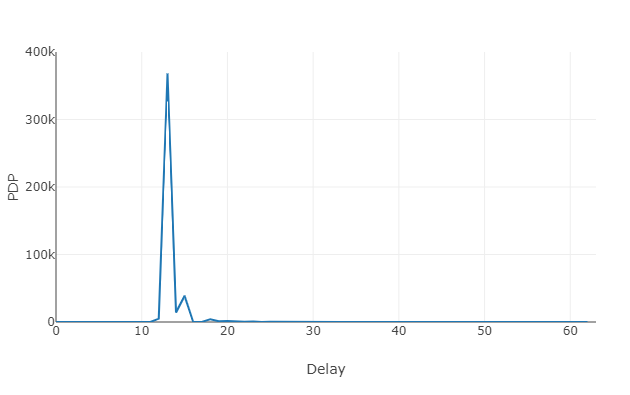
- Download channel_sounding_display_cosmos.html attached to this tutorial and open it in your browser. Once you click the start button, you should see PDP of the channel.

Attachments (2)
- pdp_sb1.png (10.4 KB ) - added by 6 years ago.
- channel_sounding_display_cosmos.html (4.1 KB ) - added by 6 years ago.
Download all attachments as: .zip