Site Navigation
- COSMOS Testbed Overview
- Getting Started
- COSMOS/ORBIT User Guide
- COSMOS Portal
- Account Management
- Portal Dashboard
- Directory
- Disk Images
- Community Forum
- Getting Started with the COSMOS Portal
- SSH Access to Testbed Nodes
- Scheduler
- Testbed Status
- Installing Chrome Remote Desktop (CRD) on a Custom Image
- Tutorials
- Architecture
- Resources, Services and APIs
- Datasets
- Hardware Info
- RF Policies & Compliance
STEM Labs for K—12 Education
This wiki page contains tutorials for the open-access remotely-accessible STEM lesson plans and labs for K—12 Education using the COSMOS testbed. The lesson plans are aligned to next generation science standards (NGSS).
Authors:
- Panagiotis Skrimponis, New York University: ps3857[at]nyu.edu
- Nikos Makris, New York University
Last updated: October 12, 2020
COSMOS Education Toolkit
Summary
The rapid evolution of technology requires major transformation in the educational system. All students should have quality access to science, technology, engineering, and mathematics (STEM) pre-college coursework in order to bridge the digital and equity divide.
To address this challenge, we developed a teacher professional development (PD) program and a toolkit consisting of a hardware and software system to engage STEM teachers in learning about wireless technology through various hands-on activities and collaborative research. Through the PD program and the development of the COSMOS Education Toolkit, the COSMOS research testbed is transformed into an innovative learning platform for K—12 urban students that would provide significant educational benefits for the local community.
The hardware setup of the 'COSMOS Education Toolkit' is inspired by the testbed's nodes. It consists of various off-the-shelf components, which, in combination with dedicated software, allows the teachers to execute a vast number of real-world experiments. The software system has been designed around a web-based graphical interface enhanced with an easy to use philosophy on the execution and management of the lab activities. The students access the graphical interface to navigate and select a lesson, execute the lab activity, and collect the measurements with a similar philosophy as the COSMOS testbed.
Publications
For more information about the 'COSMOS Education Toolkit' and the teacher's professional development program, please read:
- Panagiotis Skrimponis, Nikos Makris, Sheila Borges Rajguru, Karen Cheng, Jonatan Ostromertzky, Emily Ford, Zoran Kostic, Gil Zussman, and Thanasis Korakis, “COSMOS Educational Toolkit: Using Experimental Wireless Networking to Enhance Middle/High School STEM Education,” in ACM SIGCOMM Computer and Communication Review, vol. 50, no. 4, Oct. 2020 Download
- Panagiotis Skrimponis, Nikos Makris, Karen Cheng, Jonatan Ostromertzky, Zoran Kostic, Gil Zussman, Thanasis Korakis, and Sheila Borges Rajguru, “A Teacher Professional Development Program Using Wireless Communications and NGSS to Enhance STEM Teaching and Learning,” in Proc. 2020 ASEE Virtual Annual Conference Content Access, Jul. 2020' ASEE Download Presentation Video
- D. Raychaudhuri, I. Seskar, G. Zussman, T. Korakis, D. Kilper, T. Chen, J. Kolodziejski, M. Sherman, Z. Kostic, X. Gu, H. Krishnaswamy, S. Maheshwari, P. Skrimponis, and C. Gutterman, “Challenge: COSMOS: A city-scale programmable testbed for experimentation with advanced wireless,” in Proc. ACM MOBICOM’20, 2020." ACM Download Presentation Long Video Short Video
Please email Panagiotis if you have any questions or you are interested in using the 'COSMOS Education Toolkit' in your class. In case you use these experiments in your class please cite the above papers.
COSMOS SandBox1
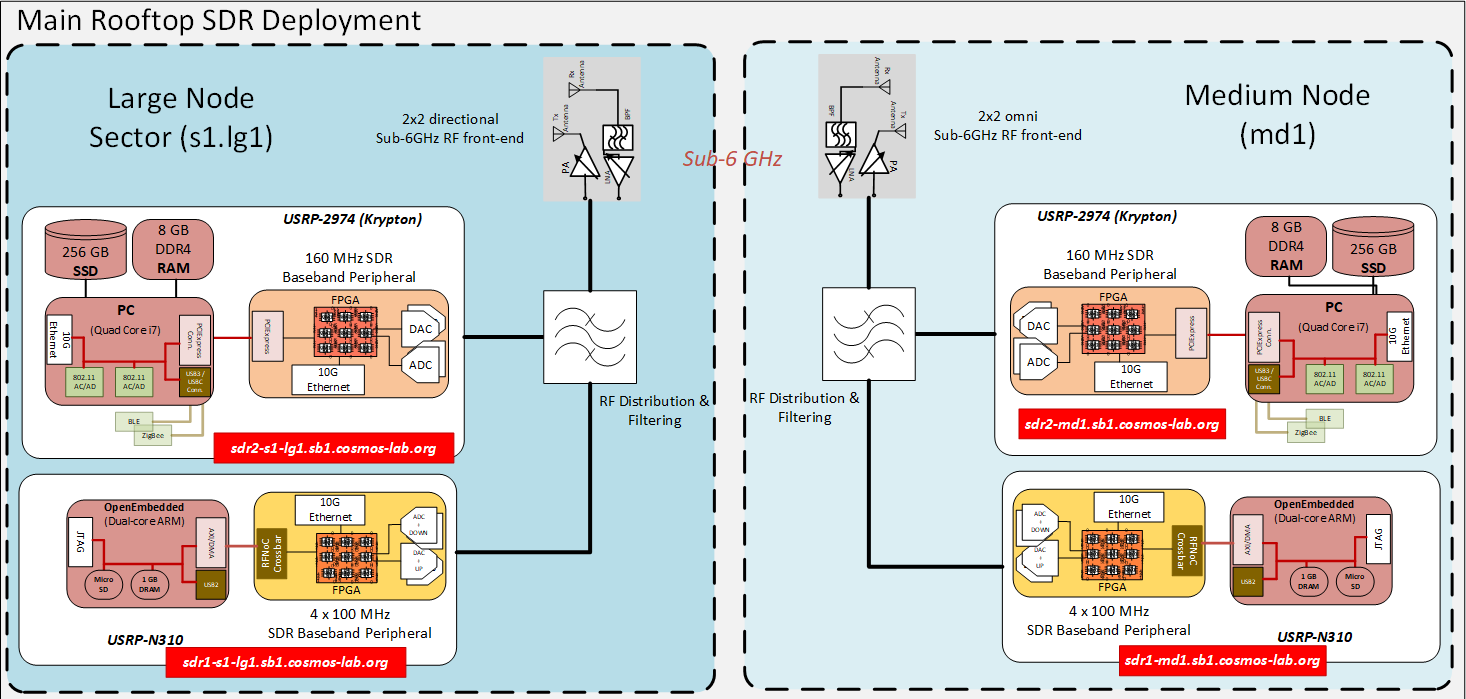
The SDR experiments of the 'COSMOS Education Toolkit' have been evaluated in sandbox 1 using the outdoor sub-6 GHz deployment. In this tutorial we will use a large s1.lg1 and a medium node md1 of the 'Main Rooftop SDR Deployment'. Both of the nodes are equiped with a USRP Krypton 2974 via PCI-e.

Node Setup
Follow the steps below to gain access to the sandbox 1 console and set up nodes with appropriate image.
- If you don't have one already, sign up for a COSMOS account
- Create a resource reservation on sandbox 1
- Login into sandbox 1 console
console.sb1.cosmos-lab.orgusing SSH. - Power off all the nodes and devices of sb1.
omf tell -a offh -t system:topo:allres
- Load the
education-toolkit.ndzonsdr2-s1-lg1andsdr2-md1.omf load -i education-toolkit.ndz -t sdr2-s1-lg1,sdr2-md1
- Power on
sdr2-s1-lg1andsdr2-md1.omf tell -a on -t sdr2-s1-lg1,sdr2-md1
- Check the status of the nodes and devices of sb1. Verify that
sdr2-s1-lg1andsdr2-md1are on.omf stat -t system:topo:allres
Experiment Setup
To run the experiments we developed a user-friendly web interface based on HTML and CSS, and back-end web-server developed in python that will control and orchestrate the experiments. The communication between the host machine and the remote testbed nodes should be in a similar way as the 'COSMOS Education Toolkit'. To enable this we to use port and X11 forwarding from the remote nodes to the local host. The following tables provide a detailed mapping of the ports for both nodes.
sdr2-s1-lg1 | ||
|---|---|---|
| Description | Remote Port | Local Port |
| Front-end web interface | 80 | 8081 |
| Back-end web server | 8090 | 8091 |
| Audio TCP server | 8100 | 8101 |
sdr2-md1 | ||
|---|---|---|
| Description | Remote Port | Local Port |
| Front-end web interface | 80 | 8082 |
| Back-end web server | 8090 | 8092 |
| Audio TCP server | 8100 | 8102 |
Port:80 is used for visualizing the web interface and start all the lessons and labs. Port:8090 is used to communicate with the back-end server. Both of these ports are essential for all the lessons and labs. Some labs require the use of a speaker so you can listen to the incoming audio signal from the SDRs. For this reason we create a TCP socket at Port:8100 of the remote node that will stream the audio to the host. For the host we create a simple python file that can be used to connect to the TCP server and listen to the music. All the GNU Radio experiments require the use of a GUI. For this reason, when you are connecting to sb1 and the node you should use either the -X or -Y option. This will forward the X11 Server from the remote node to the local host.
- Open a new terminal and enable port and X11 forwarding from
sdr2-s1-lg1not_a_user@laptop:~$ ssh -Y your_username@console.sb1.cosmos-lab.org -L 8081:sdr2-s1-lg1:80 -L 8091:sdr2-s1-lg1:8090 -L 8101:sdr2-s1-lg1:8100 your_username@console:~$ ssh -Y root@sdr2-s1-lg1
- Open a new terminal and enable port and X11 forwarding from
sdr2-md1not_a_user@laptop:~$ ssh -Y your_username@console.sb1.cosmos-lab.org -L 8082:sdr2-md1:80 -L 8092:sdr2-md1:8090 -L 8102:sdr2-md1:8100 your_username@console:~$ ssh -Y root@sdr2-md1
Both of the terminal sessions need to remain open when you are executing the experiments. After setting up the nodes, you can now start exploring the COSMOS K—12 STEM educational labs. To connect to the web interface of sdr2-s1-lg1 press http://localhost:8081, and to connect to the web interface of sdr2-md1 press http://localhost:8082.
Experiments
In the following webpages you can find detailed description for each STEM Lab.
Attachments (1)
-
sb1-rooftop.png
(166.1 KB
) - added by 6 years ago.
Main rooftop deployment of sb1
Download all attachments as: .zip