| Version 50 (modified by , 2 years ago) ( diff ) |
|---|
Site Navigation
- COSMOS Testbed Overview
- Getting Started
- COSMOS/ORBIT User Guide
- COSMOS Portal
- Account Management
- Portal Dashboard
- Directory
- Disk Images
- Community Forum
- Getting Started with the COSMOS Portal
- SSH Access to Testbed Nodes
- Scheduler
- Testbed Status
- Installing Chrome Remote Desktop (CRD) on a Custom Image
- Tutorials
- Architecture
- Resources, Services and APIs
- Datasets
- Hardware Info
- RF Policies & Compliance
Sandbox 1 (sb1.cosmos-lab.org)
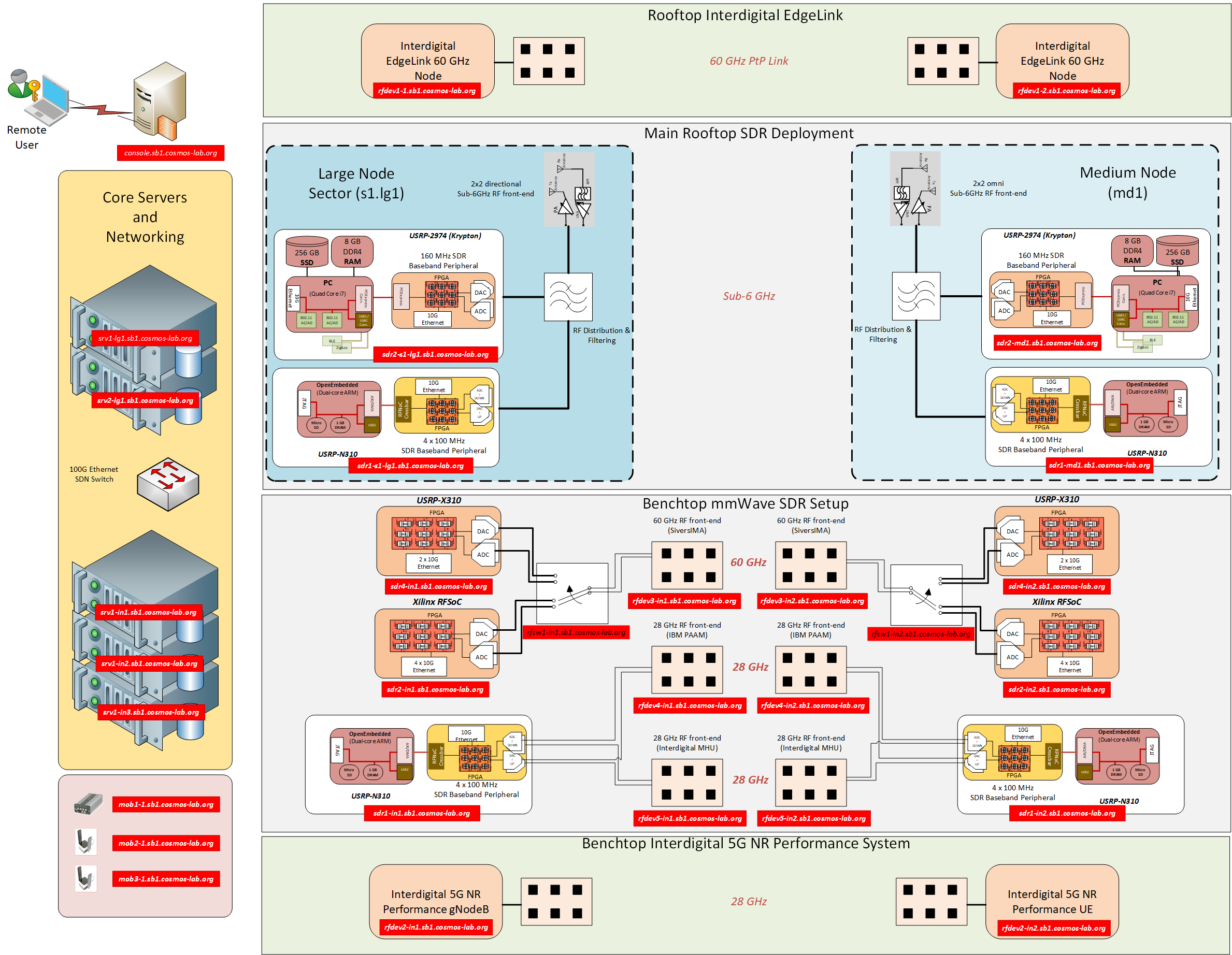
COSMOS sandbox 1, located at WINLAB's ORBIT facility in North Brunswick, NJ, is designed as a mini version representative of the current and future capabilities of the larger outdoor deployment in New York City. It is meant primarily to be a development and testing environment for researchers to become familiar with the software and hardware architectures available in COSMOS.

Sandbox 1 resources:
- SDN Ethernet Switch
- Computing resources:
- High performance compute servers
- General purpose machines used for flashing/debugging of sandbox hardware
- Outdoor rooftop deployment:
- Pair of sub-6 GHz COSMOS nodes (one sector of a large COSMOS node and one medium node)
- Pair of InterDigital 60 GHz Edgelink nodes
- Indoor “benchtop” deployment:
- InterDigital 5G Performance (28 GHz) gNodeb and UE
- USRP X310, N310, and RFSoC based mmWave development setup that includes IBM 28 GHz PAAM, Interdigital MHU 28 GHz antenna array and 60 GHz development platform antennas that are mounted on an experimenter controlled movable platform.
- Mobile devices:
- USRP E312
- Intel NUC & USRP B205/B210 Based mobile nodes
The support servers in the two corners (srv1-in1, srv1-in2) and the server supporting mobile device development (srv1-in3) are not equipped with GPU or FPGA cards and are based on Intel Quad-Core I7 CPUs (as opposed to multi-core Xeon CPUs in core servers).
IP Address Assignment
| Device | Control Network | Data Network 1 | Data Network 2 |
| Core Servers | |||
|---|---|---|---|
| Server 1 | 10.37.1.1 (srv1-lg1) | 10.38.1.1 (srv1a-lg1) | 10.39.1.1 (srv1b-lg1) |
| Server 2 | 10.37.1.2 (srv2-lg1) | 10.38.1.2 (srv2a-lg1) | 10.39.1.2 (srv2b-lg1) |
| Large Node | |||
| USRP N310 (S1) | 10.37.2.1 (sdr1-s1-lg1) | 10.38.2.1 (sdr1a-s1-lg1) | 10.39.2.1 (sdr1b-s1-lg1) |
| USRP 2974 (S1) | 10.37.2.2 (sdr2-s1-lg1) | 10.38.2.2 (sdr2a-s1-lg1) | 10.39.2.2 (sdr2b-s1-lg1) |
| Medium Node | |||
| USRP N310 | 10.37.3.1 (sdr1-md1) | 10.38.3.1 (sdr1a-md1) | 10.39.3.1 (sdr1b-md1) |
| USRP 2974 | 10.37.3.2 (sdr2-md1) | 10.38.3.2 (sdr2a-md1) | 10.39.3.2 (sdr2b-md1) |
| Interdigital EdgeLink | |||
| EdgeLink Device 1 | 10.37.4.1 (rfdev1-1) | - | - |
| EdgeLink Device 2 | 10.37.4.2 (rfdev1-2) | - | - |
| Device | Control Network | Data Network 1 | Data Network 2 |
| mmWave Development | |||
|---|---|---|---|
| First corner (1-1) | |||
| Support Server | 10.37.1.3 (srv1-in1) | 10.38.1.3 (srv1a-in1) | 10.39.1.3 (srv1b-in1) |
| Interdigital 5G NR Performance Device | 10.37.5.1 (rfdev2-in1) | 10.38.5.1 (rfdev2a-in1) | 10.39.5.1 (rfdev2b-in1) |
| USRP N310 Device | 10.37.6.1 (sdr1-in1) | 10.38.6.1 (sdr1-in1a) | 10.39.6.1 (sdr1-in1b) |
| RFSoC Device | 10.37.6.3 (sdr2-in1) | 10.38.6.3 (sdr2-in1a) | 10.39.6.3 (sdr2-in1b) |
| USRP X310 Device | 10.38.14.1 (sdr4-in1a) | 10.39.14.1 (sdr4-in1b) | |
| Second corner (20-20) | |||
| Support Server | 10.37.1.4 (srv1-in2) | 10.38.1.4 (srv1a-in2) | 10.39.1.4 (srv1b-in2) |
| Interdigital 5G NR Performance Device | 10.37.5.2 (rfdev2-in2) | 10.38.5.2 (rfdev2a-in2) | 10.39.5.2 (rfdev2b-in2) |
| USRP N310 Device | 10.37.6.2 (sdr1-in2) | 10.38.6.2 (sdr1-in2a) | 10.39.6.2 (sdr1-in2b) |
| RFSoC Device | 10.37.6.4 (sdr2-in2) | 10.38.6.4 (sdr2-in2a) | 10.39.6.4 (sdr2-in2b) |
| USRP X310 Device | 10.38.14.2 (sdr4-in2a) | 10.39.14.2 (sdr4-in2b) | |
| Device | Control Network | Data Network 1 | Data Network 2 |
| Mobile Development | |||
|---|---|---|---|
| Support Server | 10.37.1.5 (srv1-in3) | 10.38.1.5 (srv1a-in3) | 10.39.1.5 (srv1b-in3) |
| USRP E312 | 10.37.10.1 (mob1-1) | - | - |
| Small Intel NUC & B205-mini | 10.37.11.1 (mob2-1) | - | - |
| Big Intel NUC & B210 | 10.37.12.1 (mob3-1) | - | - |
RF Path Configurations for mmWave Development Platforms
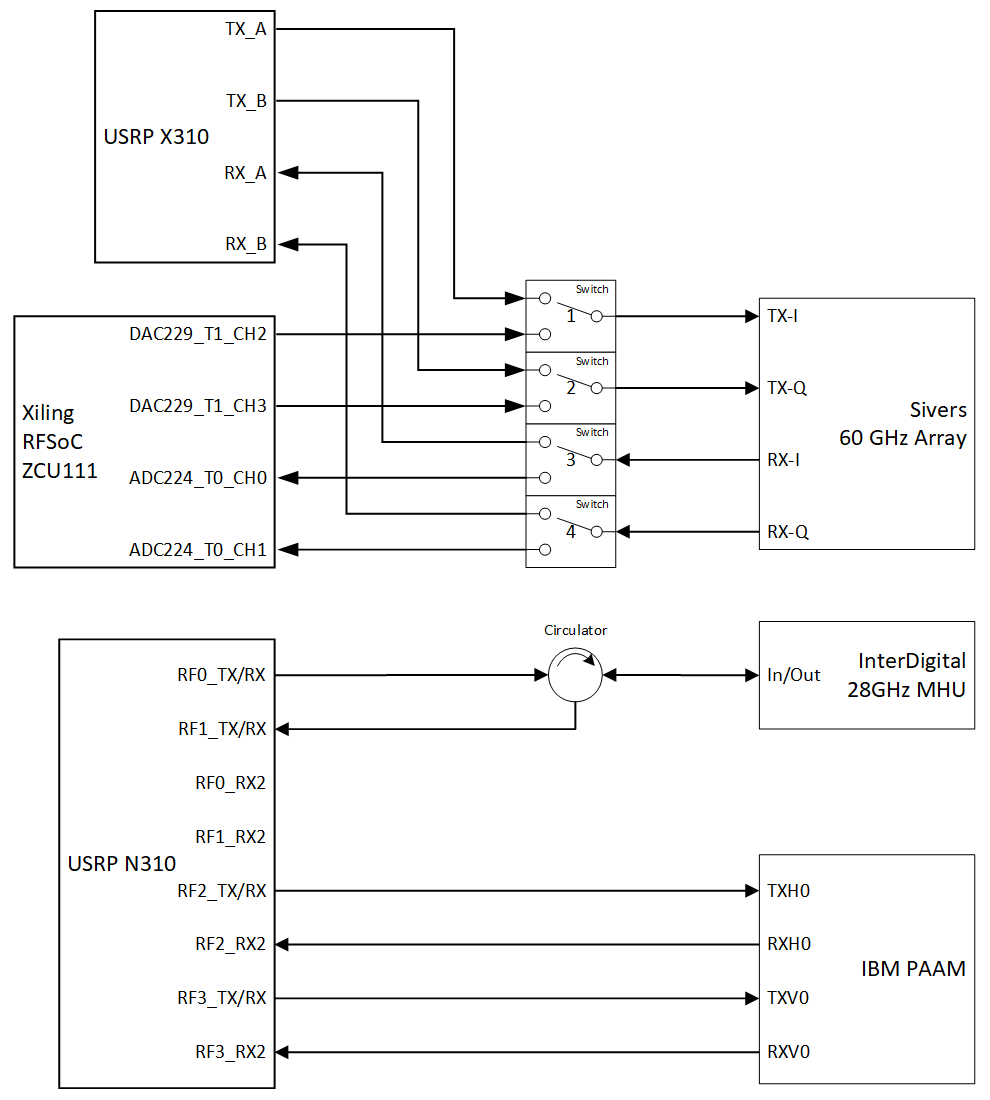
The indoor mmWave development platforms are connected to the USRP's and SDR's as shown in the following example diagram:

To select a particular configuration, follow the instructions below for the specific setup you wish to use. It is possible to use multiple setups simultaneously as long as they do not conflict with respect to RF paths.
USRP X310 with Sivers 60 GHz Array
Run the following commands on the sb1.cosmos-lab.org console:
curl "am1.cosmos-lab.org:5054/rf_switch/set?name=rfsw1.sb1.cosmos-lab.org&switch=1,2,3,4&port=1"
curl "am1.cosmos-lab.org:5054/rf_switch/set?name=rfsw2.sb1.cosmos-lab.org&switch=1,2,3,4&port=1"
The resulting RF connections will be:
USRP X310 Sivers Array TX_A TX-I TX_B TX-Q RX_A RX-I RX_B RX-Q
Xilinx RFSoC ZCU111 with Sivers 60 GHz Array
Run the following commands on the sb1.cosmos-lab.org console:
curl "am1.cosmos-lab.org:5054/rf_switch/set?name=rfsw1.sb1.cosmos-lab.org&switch=1,2,3,4&port=2"
curl "am1.cosmos-lab.org:5054/rf_switch/set?name=rfsw2.sb1.cosmos-lab.org&switch=1,2,3,4&port=2"
The resulting RF connections will be:
Xilinx RFSoC Sivers Array DAC229_T1_CH2 TX-I DAC229_T1_CH3 TX-Q ADC224_T0_CH0 RX-I ADC224_T0_CH1 RX-Q
Attachments (2)
- mmwave-rf-block-diagram.png (37.9 KB ) - added by 5 years ago.
-
SB1-BD-2022-01b.png
(443.7 KB
) - added by 4 years ago.
COSMOS Sandbox 1 Block Diagram
Download all attachments as: .zip